




Track Domain Sales
Master the Domain Aftermarket in 3 Simple Steps
💎 At DropDax, we provide a clean, streamlined window into the global domain aftermarket. Whether you are an investor looking for historical comparable sales or a buyer scouting for emerging trends across multiple platforms, here is how to get the most out of our data.
Step 1: 🔍 Browse the Global Market
We automatically update our database with real-time sales and auction results from across the industry. On our homepage, you will see organized tables displaying the most recent market activity.
Search: Looking for a specific keyword or extension (like .com or .io)? Use the search bar above the table to filter the results instantly.
Navigate by Category: Use the menu to select specific days, transaction types, or platforms.
Step 2: 📊 Analyze & Filter the Data
🔎 pinpoint the perfect domain in seconds
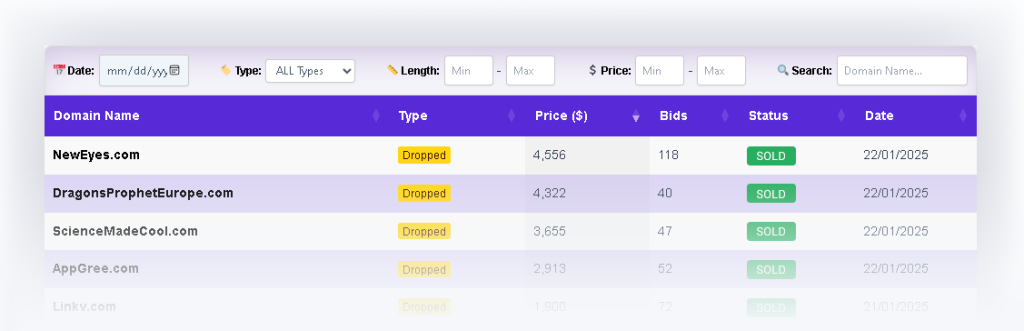
We don’t just list domains; we give you the tools to find the “needle in the haystack.” Our data table features a powerful Control Bar right at the top, allowing you to slice the data to fit your investment strategy.
1. Mastering the Filters 🎯 :
Stop scrolling through thousands of irrelevant names. Use the inputs above the table to refine your search:
📅 Date Picker: Select a specific date to view historical results or check what’s closing today.
⚡ Quick Filters: Instantly isolate the most liquid assets by clicking 4 Letters or 5 Letters.
🌐 Extensions: Toggle specific TLDs on or off (e.g., .COM, .NET, .ORG, .IO).
🚫 Exclude: Clean up your list by checking No Numbers or No Dashes to hide lower-quality names.
🏢 Venue: Filter by the specific marketplace. You can select multiple venues (like GoDaddy, Sedo, and DropCatch) to see combined results in one unified view.
📏 Length (Min – Max): The most powerful tool for investors. Looking for a rare 4-letter domain? Set both Min and Max to “4” to instantly hide everything else.
💲 Price (Min – Max): Stay within budget. Enter a “Max” price to filter out assets that have already gone too high, or set a “Min” price to filter out low-value junk.
🔍 Search: Type any keyword (like “tech” or “bet”) to instantly isolate domains containing that specific string.
Understanding the “🏷️ Type” Filter:
The domain aftermarket has different types of sales. Use this dropdown to focus on exactly how you want to acquire a name:
Dropped:
Newly available domains caught the moment they are deleted by the registry. These are sold via high-speed ‘backorder’ auctions on platforms like DropCatch, Park.io, and Catched, where the highest bidder wins the newly released name.
Private Seller:
A direct sale from one owner to another, usually at a fixed price. These are ‘retail’ or ‘marketplace’ sales found on sites like Sedo, Afternic, Atom, and DomainMarket.
Pre-Release:
Special early-access auctions for domains that have not been deleted yet. These are sourced through exclusive partner registrars (like NameBright) before the general public can buy them.
Expired Auction:
Wholesale auctions for domains that were not renewed by their previous owner. These are sold directly by registrars like GoDaddy, Dynadot, Sav, and Namecheap.
2. Reading the Metrics 🧠 :
Once you have filtered your list, here is how to read the live data columns:
Domain Name: The digital asset currently on the market or recently sold.
🏷️ Type: Look for the Yellow Badge (e.g., Dropped, Private Seller). This quickly identifies the origin and sale format of the domain.
💲 Price ($): The real-time high bid, fixed listing price, or final closing price.
🔨 Bids: This is your “Heat Index.” A high number here means intense competition. (Note: Fixed-price private sales will not have bid counts).
🟩 Status: Check the Green Badge to see where the transaction stands:
Active: You can still place a bid or purchase the domain on the venue platform.
SOLD: The auction has ended or the fixed-price sale is confirmed.
📅 Date: The specific calendar day the auction concludes or the sale was finalized.
Step 3: ✨ Spot Trends & Value Assets
DropDax is more than just a list; it is a comprehensive research tool.
Comparable Sales (Comps): Before you bid or buy a domain elsewhere, check DropDax to see what similar names have sold for recently across all major platforms.
Identify Trends: Notice a sudden spike in 4-letter domains or AI-related keywords? Use our historical data to spot market shifts before they become common knowledge.